ASP.NET Data Source=.;
FYI – here’s a trick so we don’t need to specify our local computer’s name in our web.config connectionString – because if you have multiple developers working on the same code – they each have to have different web.config versions…
 FYI – here’s a trick so we don’t need to specify our local computer’s name in our web.config connectionString – because if you have multiple developers working on the same code – they each have to have different web.config versions with their individual computer names.
Generally we see…
<connectionStrings>
<add name=”MyContext” connectionString=”Data Source=MYCOMPUTER; Initial Catalog=MyDatabase; Integrated Security=True; MultipleActiveResultSets=True” providerName=”System.Data.SqlClient” />
</connectionStrings>
What we want…
<connectionStrings>
<add name=”MyContext” connectionString=”Data Source=.; Initial Catalog=MyDatabase; Integrated Security=True; MultipleActiveResultSets=True” providerName=”System.Data.SqlClient” />
</connectionStrings>
How?
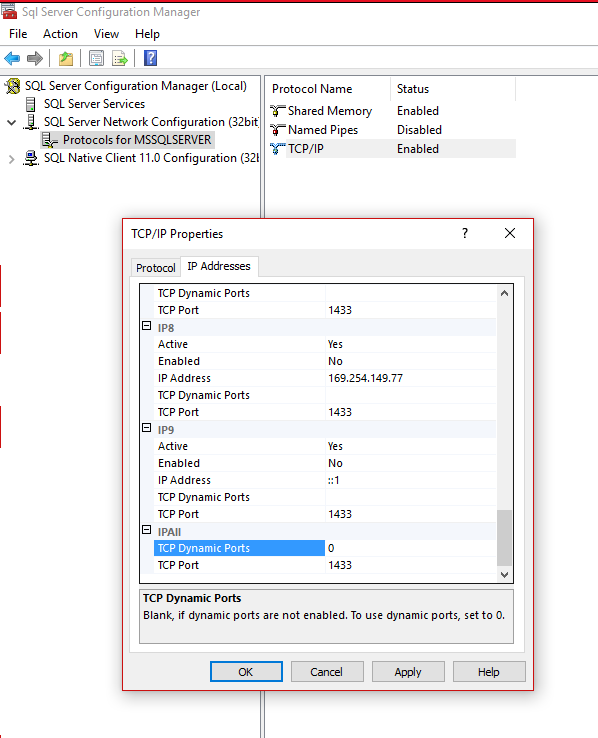
1) Open your “Sql Server Configuration Manager” application.
2) Expand your “Sql Server Network Configuration”.
3) Right-click on “TCP/IP”.
4) Scroll down to “TCP Dynamic Ports” (which will be blank by default) and enter “0” which enables it.
5) Restart your SQL service and you’re DONE!
Thanks Travis Feirtag (@therobotgeek) for this trick!