Custom Configuration Pattern 101
So if you’ve even needed to store custom data in your App.config or Web.config files before – you’ve probably used the ConfigurationManager.AppSettings for name/value pair data – but what if you have more complex settings that you want to store…
So if you’ve even needed to store custom data in your App.config or Web.config files before – you’ve probably used the ConfigurationManager.AppSettings for name/value pair data – but what if you have more complex settings that you want to store in the config files?
Such as…
<Certificate findValue="7776F8E373CF19EEEC88293031893B8D985792F8"
storeLocation="LocalMachine"
storeName="TrustedPeople"
x509FindType="FindByThumbprint"/>
What do we do? We extend .NET’s System.Configuration.ConfigurationSection of course… 🙂
First, let’s create the ever popular console test application.
Open Visual Studio –> “File” –> “New” –> “Project”. Choose “Console Application” and name it “CustomConfigurationPattern”.
Right click on the “Solution” and click “Add” –> “New Project” –> choose “Class Library” and name it “ConfigurationLoader”.
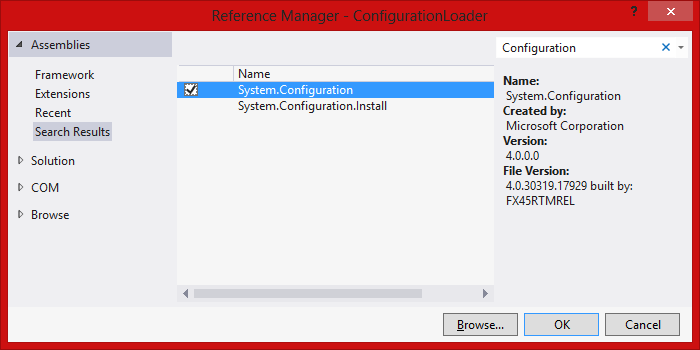 Now add the “System.Configuration” reference to both projects.
Now in the “ConfigurationLoader” project –> “Add” –> ‘New Class…” and name it “CertificateConfigurationSingle” – the code is as follows:
using System.Configuration;
namespace ConfigurationLoader
{
/// <summary>
/// Used for loading values from the following configuration xml
/// <certificate
/// findValue="7776F8E373CF19EEEC88293031893B8D985792F8"
/// storeLocation="LocalMachine"
/// storeName="TrustedPeople"
/// x509FindType="FindByThumbprint" />
/// </summary>
public class CertificateConfigurationSingle : ConfigurationSection
{
#region Fields
private const string _sectionNameXml = "Certificate";
private const string _findValueXml = "findValue";
private const string _storeLocationXml = "storeLocation";
private const string _storeNameXml = "storeName";
private const string _x509FindTypeXml = "x509FindType";
#endregion
#region Properties
/// <summary>
/// Gets the settings.
/// </summary>
/// <value>
/// The settings.
/// </value>
public static CertificateConfigurationSingle Settings
{
get
{
return (CertificateConfigurationSingle)
ConfigurationManager.GetSection(_sectionNameXml);
}
}
/// <summary>
/// Gets or sets the find value.
/// </summary>
[ConfigurationProperty(_findValueXml)]
public string FindValue
{
get { return (string)this[_findValueXml]; }
set { this[_findValueXml] = value; }
}
/// <summary>
/// Gets or sets the store location.
/// </summary>
[ConfigurationProperty(_storeLocationXml)]
public string StoreLocation
{
get { return (string)this[_storeLocationXml]; }
set { this[_storeLocationXml] = value; }
}
/// <summary>
/// Gets or sets the name of the store.
/// </summary>
[ConfigurationProperty(_storeNameXml)]
public string StoreName
{
get { return (string)this[_storeNameXml]; }
set { this[_storeNameXml] = value; }
}
/// <summary>
/// Gets or sets the type of the X509 find.
/// </summary>
[ConfigurationProperty(_x509FindTypeXml)]
public string X509FindType
{
get { return (string)this[_x509FindTypeXml]; }
set { this[_x509FindTypeXml] = value; }
}
#endregion
}
}
Next – we need to add a little more to our App.config – we need to specifically add the <configSections> xml – in which we need to have the “name” match the root xml element, in this case it’s our “<Certificate …” tag. Then we need the “type” to match our fully qualified class name, followed by the assembly name. Our full App.config should look like this…
<?xml version="1.0" encoding="utf-8" ?>
<configuration>
<configSections>
<section name="Certificate" type="ConfigurationLoader.CertificateConfigurationSingle, ConfigurationLoader"/>
</configSections>
<Certificate findValue="7776F8E373CF19EEEC88293031893B8D985792F8"
storeLocation="LocalMachine"
storeName="TrustedPeople"
x509FindType="FindByThumbprint"/>
</configuration>
So looking at the code from our “CertificateConfigurationSingle” class – we first see that our class is derived from the System.Configuration.ConfigurationSection.
public class CertificateConfigurationSingle : ConfigurationSection
Next, starting on line 33 the code uses the ConfigurationManager.GetSection() method with the “SectionName” variable matching the “Certificate” tag in the App.config file’s <configSections>. If something is incorrect in your App.config – this is where an exception will be thrown.
public static CertificateConfigurationSingle Settings
{
get
{
return (CertificateConfigurationSingle)
ConfigurationManager.GetSection(_sectionNameXml);
}
}
Then all that is left to do is to expose the matching properties, such as for “FindValue” – in the following format. Note, the [ConfigurationProperty()] attribute needs to have the corresponding xml tag associated ( I pass them in as a “private const string”s as I hate “magic” strings – and having it once as a “const string” will prevent typos )
/// <summary>
/// Gets or sets the find value.
/// </summary>
[ConfigurationProperty(_findValueXml)]
public string FindValue
{
get { return (string)this[_findValueXml]; }
set { this[_findValueXml] = value; }
}
Now that we have that done – all we need is to call it from our console app as follows…
using System;
using ConfigurationLoader;
namespace CustomConfigurationPattern
{
class Program
{
static void Main()
{
//----------------------------------------------------------------------
// Load a single element certificate
//----------------------------------------------------------------------
Console.WriteLine(CertificateConfigurationSingle.Settings.FindValue);
Console.WriteLine(CertificateConfigurationSingle.Settings.StoreLocation);
Console.WriteLine(CertificateConfigurationSingle.Settings.StoreName);
Console.WriteLine(CertificateConfigurationSingle.Settings.X509FindType);
Console.WriteLine("----------------------");
Console.ReadLine();
}
}
}
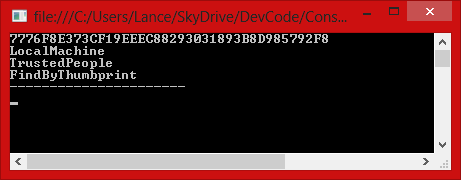
Now when we run it – we get awesome sauce!
In “Custom Configuration Pattern 102” – we will take this further and look at parsing even more complex nested custom configuration items such as…
<CertificateSection authenticationMode="Test">
<Certificates>
<add certificateType="cipherCertificate"
findValue="E86D56AC84D51F9C2D12C898341F5FA38E909B02"
storeLocation="LocalMachine"
storeName="TrustedPeople"
x509FindType="FindByThumbprint"/>
<add certificateType="serviceCertificate"
findValue="3D25DB176A2098F010C288761F5B367F3DFA07FA"
storeLocation="LocalMachine"
storeName="TrustedPeople"
x509FindType="FindByThumbprint"/>
</Certificates>
</CertificateSection>
Good coding!
…Lance