Entity Framework “Code First + Computed GETDATE()”
Need to setup a “Created” DateTime field in your SQL table that is auto-computed to add the current date and time that the field is inserted into the database? If you’re doing so in SQL – in the “Default Value…
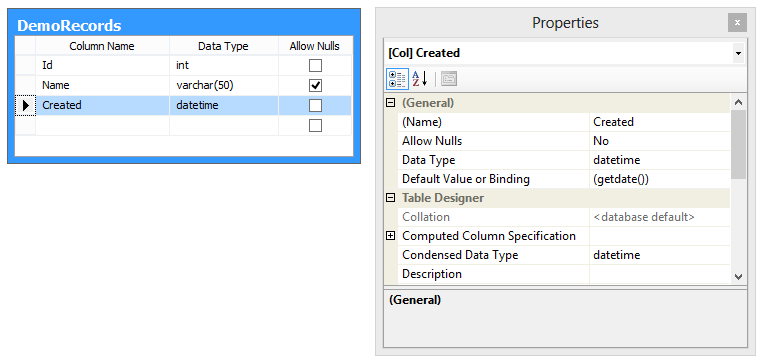 Need to setup a “Created” DateTime field in your SQL table that is auto-computed to add the current date and time that the field is inserted into the database?
If you’re doing so in SQL – in the “Default Value or Binding” you just need to enter GETDATE() or GETUTCDATE() – insert a record, and you’ll see the date/time value automatically added to that column. “…that was easy…”
But how to do the same thing when using Entity Framework Code First?
No big deal here either – as long as you add the couple lines of code described here…
First, we need to add the “DatabaseGenerated” DataAnnotation that describes the “Created” field as a computed field. See Code First DataAnnotation’s for more…
public class DemoRecord
{
public long Id { get; set; }
public string Name { get; set; }
[DatabaseGenerated(DatabaseGeneratedOption.Computed)]
public DateTime? Created { get; set; }
}
Then as we discussed in my earlier Code First blog posts (Entity Framework “Code First + Migration” 101 and Entity Framework “Code First + Existing Database” 102) – in the “Package Manager Console” window type “Add-Migration AddedComputedColumn” – where “AddedComputedColumn” could be any name you want to give this update — and then in the “Migrations” folder open the newly created migration script matching the name you gave it, for example, “201309021659377_AddedComputedColumn.cs” – commenting out what you see in line 5, with the updated command in line 6.
public partial class AddedComputedColumn : DbMigration
{
public override void Up()
{
//AddColumn("dbo.DemoRecords", "Created", c => c.DateTime());
AddColumn("dbo.DemoRecords", "Created", c => c.DateTime(defaultValueSql: "GETDATE()"));
}
public override void Down()
{
DropColumn("dbo.DemoRecords", "Created");
}
}
And simple as that, in the “Package Manager Console” when you type “Update-Database” – you now have a auto-computed date/time field… Rock on…